 448413c9f7 |
||
|---|---|---|
| .github | ||
| .vscode | ||
| docs | ||
| extension/assets | ||
| scripts | ||
| src | ||
| .eslintignore | ||
| .eslintrc.cjs | ||
| .gitignore | ||
| .npmrc | ||
| .prettierrc | ||
| GitVersion.yml | ||
| LICENSE | ||
| README.md | ||
| package.json | ||
| pnpm-lock.yaml | ||
| tsconfig.json | ||
| vite.config.content.ts | ||
| vite.config.ts | ||
README.md
SzuruChrome
Chrome/Firefox extension which can import media from various sites into a szurubooru instance.
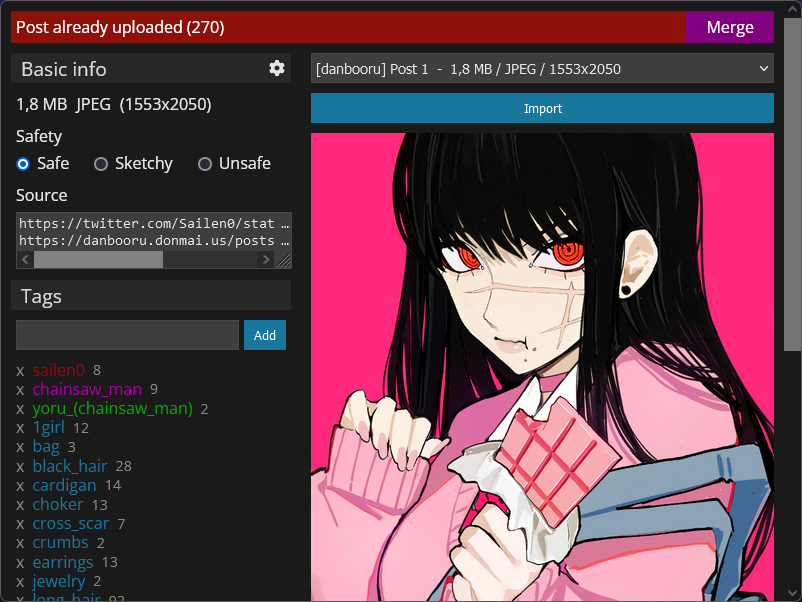
Installation
Firefox
I am experimenting with publishing the extension to Firefox Add-ons. You can find it here. This version will automatically update.
You can also download the .xpi from the release tab and manually install it. This version will not automatically update.
Both versions can be installed side by side, as they do not affect each other. This also means that you need to configure both of them independently.
Chrome
I can't create a valid .crx file, which means that you'll have to use Chrome's "Load unpacked extension" feature. You can download a .zip containing the needed files from the release tab. Check this Stack Overflow answer if you want to get rid of the developer extension popup.
Build/debug
# Install node modules
pnpm install

# Live dev build (watch)
pnpm dev

# Production build
pnpm build
After this you can load them in your browser.
Chrome: chrome://extensions/ → "Load unpacked" → Select ./dist folder
Firefox: about:debugging → "Load Temporary Add-on..." → Select any file in the ./dist folder (it will load all files)
See the developer notes for more information.